
Your Photo Matters – Represent Yourself and Your Company Professionally
A clear, high-quality photo ensures smooth identification and reflects a strong, professional image of your organization.
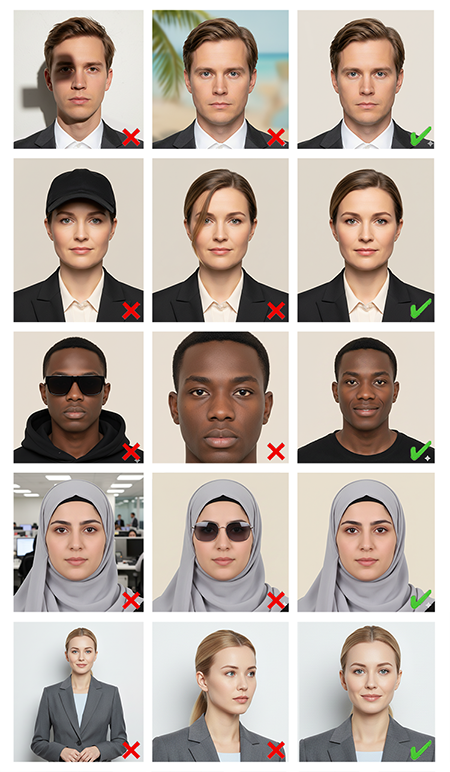
Guidelines for ID Photos
The photo must have good resolution and resemble a passport photo.
It should show some space above the head, part of the shoulders, and fit properly within the frame.
Eyes must be open and clearly visible, not covered by hair, tinted glasses, or other objects.
Glasses with clear lenses are allowed, but without glare.
Headwear is not permitted, except for religious head coverings, provided that the chin, forehead, and cheeks are fully visible.
Take the photo straight from the front with good lighting, without shadows. No hands, sunglasses, or other objects in the image.
Use the zoom function when uploading to adjust the photo. Ensure the head and shoulders are visible, but do not zoom so much that the forehead or chin is cropped out.
Tips for Uploading:
If you experience issues uploading, open the image in an editing program and save it as a copy with a new name, preferably in JPG or PNG format.
You can upload the image from a phone, tablet, PC, or Mac.
The image should not exceed 4 MB in size.